Find any image on your computer. Just describe it.
Type "red flower", drop in a photo, or pick a face - Image Finder finds the right file among lakhs of photos, designs (PSD, CDR, AI) and PDFs in about a tenth of a second. Nothing is uploaded.
Choose your computer and a plan - the download starts by itself right after paying
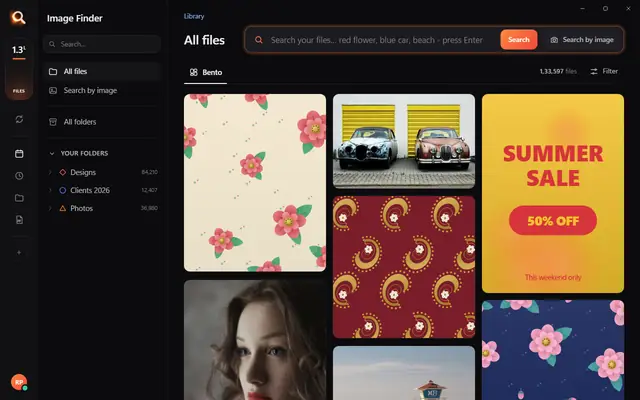
The real Image Finder window with sample files - click anywhere in it to try it yourself. In the app it searches lakhs of your own files in a fraction of a second, all on your PC. Open it full screen
Sound familiar?
You remember the picture, not the file name.
It's somewhere in IMG_4821, final_final_v3.psd or New folder (7).
Windows search only knows names.
It can't see a red flower, a logo or a face inside your files.
Photo apps want your files uploaded.
And they can't open PSD, CDR or AI designs at all.
Image Finder looks inside every file - so you find it the way you remember it.
Four ways to find it. One click to share it.
By words
Type what you see.
red flowerblu car → blue carbeach
By words
Type what you see.
Your own words. Type the way you talk - "red flower", "blue car", "beach". Spelling mistakes are fixed for you.
Words inside files. Posters, PDFs and scans are read once, so a line of text inside a file finds it.
Colours and categories. Pick a colour or a category to narrow any search in one click.
By a picture
Drop in any picture.
Search by image
By a picture
Drop in any picture.
The exact file. Drag in a photo of a design - from WhatsApp, the web or a phone - and the original file is found.
Every look-alike. Similar designs and photos come right after it, the closest first.
Paste works too. Copy a picture anywhere and press Ctrl+V in Image Finder.
By one part
One motif. Every file that has it.
By one part
One motif. Every file that has it.
Draw a box. Open a design, draw a box around one part of it - a flower, a logo, a border.
Found everywhere. Every file that contains that part shows up, with the place marked.
Even small parts. It looks inside each design, not only at the whole picture.
By a face
One face. Every photo.
By a face
One face. Every photo.
Pick a face. Open any photo with people and press Person.
Only that person. Every photo of just that person, from a whole event or years of folders.
On your PC only. Faces are recognised on your computer - nothing is sent anywhere.
Then share it
WhatsApp, PDF, Drive. One click.
Then share it
WhatsApp, PDF, Drive. One click.
Straight to the chat. WhatsApp, Telegram, Gmail, Outlook or Drive: the file is copied and the app opens.
A catalogue PDF. Select a few files and send them as one PDF with names and descriptions, in your layout.
Light or original. Send a quick JPG preview, or the original file.
Always ready
New files show up in seconds.
1,33,597files up to date
Always ready
New files show up in seconds.
New files in seconds. Add a folder or a whole drive; new and changed files appear within seconds.
Quiet in the background. Syncing steps aside while you work in your design programs.
Pause any time. Pause or stop and carry on later from the same place.
Why not just use Windows search?
Because it only knows file names. Here is what changes.
Image FinderWindows File Explorer searchCloud photo apps
Find a picture by describing what is in itNames and dates onlyPhotos only
Search with a picture - find the original and look-alikesSome apps
Find every file that has one part of a design
Opens design files - PSD, CDR, AI, EPS - and camera RAWNames only
Works with no internet
Your files stay on your computerUploaded
Works on any Windows 10 / 11 PC or Mac
Windows 11's Photos app can search by description only on new Copilot+ PCs, and only in photos.
Built for real libraries.
Lakhs of files, many folders, many names - and people who have no time to look.
Private by design.
Your designs, photos and searches stay with you - on your own PC. Nothing is uploaded, and nobody else can see them.
Only on your PC
Fast on any PC.
About a tenth of a second per search - even in a lakh-plus library.
1,33,597 files searched
107 file types.
Photoshop, CorelDRAW, Illustrator, PDF, camera RAW, videos, fonts - with real previews.
PSD
Selected 0
107 types
Made for anyone with a big library.
Designers & print shops
"floral border maroon" - the right PSD or CDR from lakhs of designs, while the client waits.
Photographers & studios
Every photo of one person from a whole wedding, in one click.
Offices & agencies
Logos, posters and PDFs found by the words printed inside them.
Everyone with years of photos
"beach", "birthday cake", "red car" - no folders to dig through.
Simple pricing.
₹1 per day. Pay once for the time you need - no auto-debit.
One licence works on one PC. Your time starts when you activate Image Finder on your PC.
Searching in three minutes.
1
Choose a plan and pay
UPI, cards, net banking or wallets. Your website account is made with your email and password.
2
Download - your key is inside
Your licence key is made the moment the payment is done. Download Image Finder right away.
3
Install and choose folders
Click Install, pick the drives and folders to search - and start finding while it reads them.
Questions? Answers.
How do I find a picture on my computer if I don't know its name?
Open Image Finder and describe it - "red flower", "blue car", "birthday cake". It looks at what is inside every picture, so the file name does not matter. You can also drop in a similar picture, or pick a face.
Is it better than Windows search?
Windows File Explorer finds files by their names and dates. Image Finder finds them by what is in them - words, pictures, a part of a design or a face - and it also opens design files like PSD, CDR and AI. Windows 11's own describe-search in the Photos app needs a new Copilot+ PC; Image Finder works on any Windows 10 or 11 PC.
Does it upload my files?
No. Image Finder works fully on your computer. Your files, pictures and searches never leave it. Only your licence is checked online, once every few days.
Does it work without internet?
Yes. Searching, previews and sharing to folders work offline. It needs the internet only to check your licence now and then, and to send to WhatsApp, Gmail or Drive.
Which file types does it search?
107 types: Photoshop (PSD, PSB), CorelDRAW (CDR), Illustrator (AI, EPS), PDF, every photo format including camera RAW (NEF, CR2, ARW), HEIC, SVG, Office files, fonts and videos - all with real previews.
Can it search inside PSD and CDR files?
Yes. It sees the design itself, so "red rose border" finds the right PSD or CDR, and a photo of a printed design finds its original file.
Does it work on Mac?
Yes - there are versions for Macs with Apple M chips and for older Macs with Intel chips, and for Windows 10 and 11.
What computer do I need?
Windows 10 or 11 (or a Mac), 8 GB RAM or more, and about 2 GB free space plus room for previews of your files. No special graphics card is needed.
How much does it cost?
About ₹1 a day - from ₹30 for a month. You pay once for the time you choose; there is no auto-debit and nothing renews by itself.
Can I use one licence on two PCs?
One licence works on one PC. If you change your PC, remove the licence from the old one (in the app, or in your account on this website) and activate it on the new PC.
How do I pay?
UPI (GPay, PhonePe, Paytm), debit and credit cards (also international cards), net banking and wallets. You get an invoice by email.